
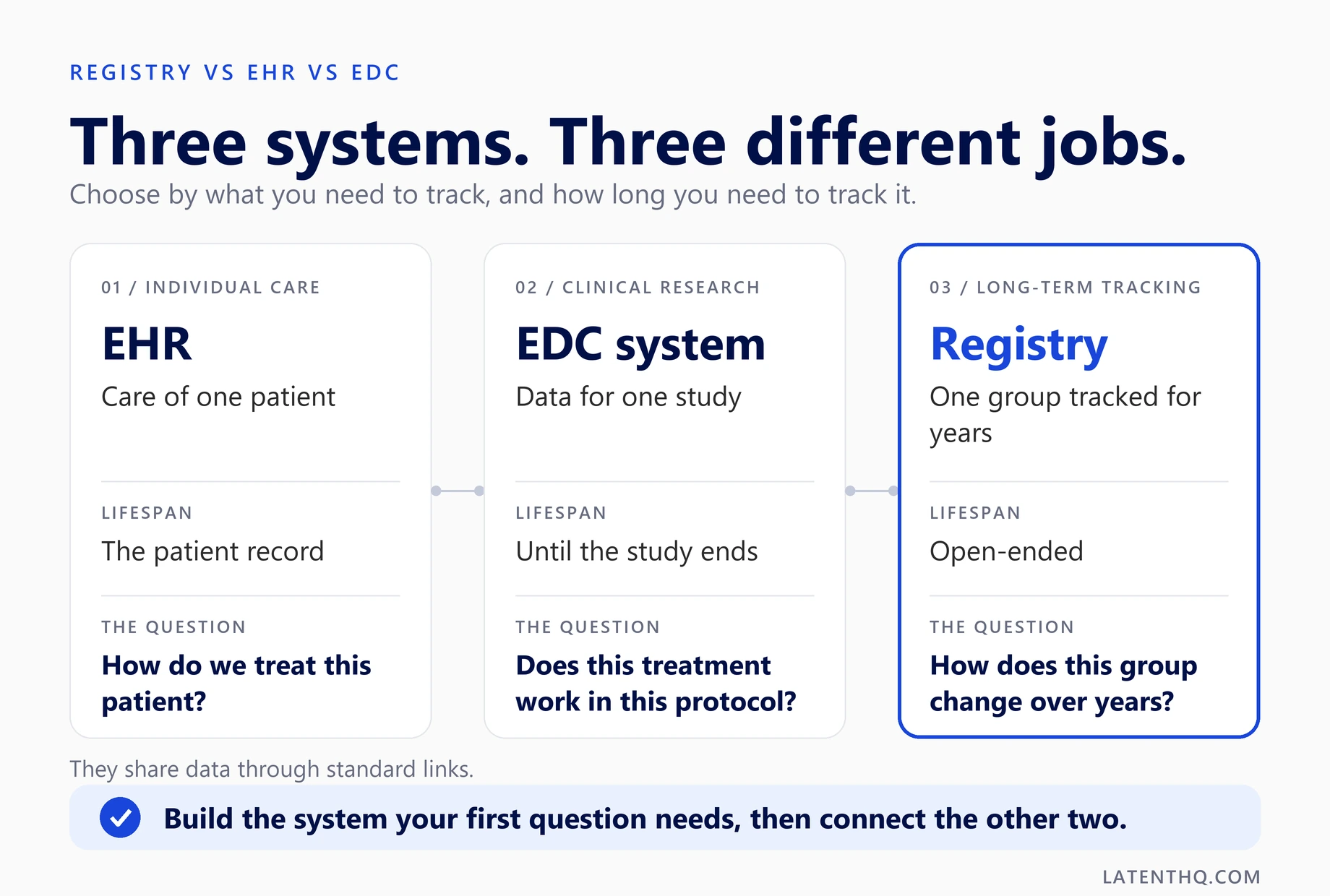
Registry vs EHR vs EDC is a question of purpose. An EHR runs the care of one patient. An EDC system runs one clinical study. A registry follows a group of patients for years. This guide shows how registry vs EHR vs EDC differs, how the three share data and which one to build first.
Key Takeaways
- Registry vs EHR vs EDC comes down to purpose. An EHR is the working record for one patient's care. An EDC system collects data for one study. A registry tracks the same group of patients for years.
- A patient registry vs EHR comparison shows the link: a registry can read EHR data, but it adds standard fields, consent and follow-up that an EHR does not hold. Treat the EHR as a source, not a replacement.
- Registry vs EDC is not a contest. An EDC system fits a study with a set end date. A registry fits a long-running group. Many programs connect the two so registry patients can join future trials.
- EHR vs EDC needs separate validation and access rules. Build the system your first question needs. Latent HQ lists EMR and EHR builds from $40,000, plus a registry case with a $50,000 to $75,000 budget.
Registry vs EHR vs EDC: What Does Each One Do?
Registry vs EHR vs EDC looks like a naming problem, but it is a purpose problem. Each system answers a different question. Mixing them up leads teams to buy one tool and expect it to do all three jobs.
An electronic health record (EHR) is the working record of a patient's care. The Office of the National Coordinator for Health IT says an EHR focuses on the total health of the patient. An electronic data capture (EDC) system collects the data a clinical study needs, in the form the study protocol sets. A registry collects the same data from a defined group of patients over time.
|
System |
Built for |
Typical lifespan |
|
EHR |
The care of one patient across visits |
The life of the patient record |
|
EDC system |
Data for one clinical study under a protocol |
The length of the study |
|
Registry |
Standard data on a group, tracked over years |
Years, often open-ended |
The Centers for Medicare and Medicaid Services described a qualified clinical data registry in 2015 guidance as an approved entity that collects clinical data to track patients and diseases and improve the quality of care. That is the registry idea in one line.
A healthcare software development company usually hears this question after a team has bought one tool. The tool does one job well and the other two badly. Start with the job, not the product.
Think of the three as a chain. The EHR captures what happens in care. The registry keeps the standard long-term view of a group. The EDC system proves a point in one study. Registry vs EHR vs EDC only becomes confusing when one tool is asked to be the whole chain. Name the job of each link first, then pick the tools.
Registry vs EHR vs EDC is a question of purpose: an EHR serves the care of one patient, an EDC system serves one study, and a registry serves a group over years.
Registry vs EHR: Why Is It Not the Same Record?
Registry vs EHR is the comparison people ask about most, and the answer is scope. An EHR holds everything about one patient's care. A registry holds a chosen set of fields about many patients. The two overlap, but neither replaces the other.
The Office of the National Coordinator says an EHR is built to be reached by everyone involved in a patient's care, including the patient. That makes it a living record. Notes change, orders change and each site records things its own way.
A registry needs the opposite. Every patient gets the same fields, set before data collection starts. That lets you compare people across sites and years. In a patient registry vs EHR review, this is the main test: can you ask the same question of every record and get the same kind of answer?
Registries often read from the EHR, so staff do not retype lab values. They still need their own forms for things the EHR never captures, such as a standard symptom score. They also need consent records that tie each person to the version they accepted.
For registry reports inside your own EHR, see our EMR and EHR software development work on registry dashboards. One example is the oncology registry built for Formly at Tata Memorial. The point is the same in every case: the EHR feeds the registry, and the registry answers the research question.
Run a short check when you weigh registry vs EHR for your own program. Do all patients share the same fields? Can you share group data without names? Can you show which consent version each person accepted? Can you pull the same report in a year and get the same meaning? If any answer is no, the EHR alone will not do the registry's job. The check is quick, and it can save a lot of rework.
Registry vs EHR comes down to scope: an EHR is the full record of one patient's care, while a registry holds the same chosen fields for every patient so groups can be compared.
Registry vs EDC: What Is the Real Difference?
Registry vs EDC is a difference of time and structure. An EDC system captures data for a single study. Latent HQ's registry page draws the same line. It says a registry follows a group over many years and can supply more than one study. One has an end date. The other usually does not. Compared with registry vs EHR, the registry vs EDC question is about time, not scope.
An EDC system is built around a protocol. It holds case report forms, a visit schedule and rules that check each value as it is entered. When the study ends, the database is locked and analysed. A registry has no lock date in the same sense. New patients join, forms change as the field learns more, and the data keeps growing.
That is why registry vs EDC is rarely an either-or choice, and why registry vs EHR and registry vs EDC get asked together. A registry can use EDC features, such as edit checks and audit trails. An EDC system can sit beside a registry when a trial recruits from it. Our guide to EDC in clinical trials explains how the study side works.
Use registry vs EDC as a planning test. Ask whether the data must live past one study. If yes, start with the registry and connect the EDC system when a trial needs it. If no, an EDC system alone may be enough.
Latent HQ's custom EDC page adds one more link: it lists EDC-to-registry integration so data from both flows in one place. That is the pattern most programs end up with. Think of the EDC system as a sprint with a finish line, and the registry as a long walk. A good plan funds both and joins them when a study starts recruiting.
Registry vs EDC is a difference of time: an EDC system closes when its study ends, while a registry keeps tracking a group and often supplies several studies.
EHR vs EDC: Why Can One System Not Do Both?
EHR vs EDC is a question teams ask when they want to avoid double entry. It is a fair question. The two systems are built for different rules. An EHR is built for care. An EDC system is built for a protocol.
In an EHR, clinicians chart what they see and do. The record has to be flexible. In an EDC system, each field is fixed by the protocol, each value is checked on entry and each change is logged. Those controls would slow down daily care, so an EHR does not carry them.
In any registry vs EHR vs EDC plan, the EHR is the source of care data. The EDC system is the home of protocol data.
The reverse is also true. An EDC system has no billing, scheduling or prescribing. Staff would never run a clinic in it. EHR vs EDC is therefore a case of two tools that need each other, not one tool that can stand in for the other. It is also easier to settle once registry vs EHR is clear.
The practical fix is a link. Data from the EHR can pre-fill EDC fields, and coordinators then confirm each value. That cuts retyping and keeps the study record clean. When off-the-shelf EDC tools do not match your protocol, our custom EDC software development builds the system around your forms and visit schedule. Latent HQ lists a working EDC module at 6 to 10 weeks on that page.
EHR vs EDC is a case of two tools that need each other: the EHR runs daily care, the EDC system runs protocol data, and a good link between them saves retyping.
Registry vs EHR vs EDC: Which Controls Apply?
Registry vs EHR vs EDC also differs in the controls each one needs. All three need access control and an audit trail. The depth depends on how the data is used. Confirm that with your quality team before you fix the design.
For clinical trials, the guideline ICH E6(R3) is the main reference. It was adopted on 6 January 2025. Section 4.3.4 says computerised systems should be appropriately validated before use. It also says validation should follow a risk assessment. That fits an EDC system, because trial data supports decisions about patient safety and results.
An EHR holds protected health information, so access control matters most. Each person should see only what their role needs. A registry adds two more controls: consent records and a way to share group data without names. When a registry feeds a trial, the trial side may need the stricter checks. Plan for that early. Adding validation to a live system is slower than building it in.
Three habits keep all three systems in order:
- Give each role the least access it needs.
- Keep a time-stamped log of every change.
- Write down how each system was tested before use.
Registry vs EHR vs EDC differs in control depth: all three need access control and audit trails, and the system that supports a trial needs validation planned before first use.
Registry vs EHR vs EDC: How Do They Share Data?
Registry vs EHR vs EDC works best when the three share data on purpose. Data usually flows in two directions. The EHR sends care data to the registry or the EDC system. The registry sends a pool of consented patients to a trial. Each step needs clear rules.
HL7 and FHIR links move the data. Latent HQ's registry page lists EHR and EDC connections that use both. A shared data dictionary keeps the meaning of each field the same on both sides. Consent controls what may move. A patient who joined a registry did not necessarily agree to a trial. Ask for permission to be contacted at enrollment, and store it as data. Then the registry can become a recruiting pool without new paperwork.
Plan who owns each field in your registry vs EHR vs EDC setup. A lab value should have one source. If it lives in the EHR, the registry should read it, not store a second copy that drifts. Our guide to patient registry software development covers consent, governance and cost in depth. It is the next read if the registry is your first build.
In registry vs EHR vs EDC, the three systems share data best when the EHR is the source, the registry holds the standard long-term copy, and consent decides which patients a trial may contact.
Registry vs EHR vs EDC: Which Do You Need First?
Registry vs EHR vs EDC has a simple rule for sequencing: build for your first question. The question tells you which system leads. The others connect later.
|
Your first question |
Start with |
Why |
|
How does a disease group change over years? |
Registry |
It holds standard fields over time |
|
Does this treatment work in one protocol? |
EDC system |
It locks protocol data at study end |
|
How do we run care and billing for a practice? |
EHR |
It is built for daily care |
|
Can one patient group feed several studies? |
Registry, then EDC |
Registry patients join trials |
Latent HQ's registry page lists a registry-to-trial path, which is why registry first, then EDC, is a common order. Most digital health teams already have an EHR, so the real choice is between a registry and an EDC system. If you need both, start with the one that carries the longer-lived data. That is usually the registry.
Do not stretch one tool to cover all three jobs. A spreadsheet-based registry fails at consent and audit. An EHR used as an EDC system fails at protocol control. Registry vs EHR vs EDC is cheaper to get right at the start than to untangle after launch.
Keep the first release small. Build one registry for one disease, or one EDC module for one study. Prove the data model, then add the links.
Registry vs EHR vs EDC is cheapest to settle by building for your first question, then connecting the other two systems once that data model is proven.
What Does Each System Cost to Build?
Registry vs EHR vs EDC costs depend on scope, not on the label. Latent HQ publishes a few ranges on its service pages and one registry budget. Use them as reference points. They are published ranges, not a quote.
|
Source |
Figure on the page |
What it shows |
|
EMR or EHR starter build |
From $40,000 |
A focused core for one specialty or workflow |
|
Full custom EMR or EHR |
Typically $150K to $500K |
Practices and clinics |
|
Hospital EHR platform |
Typically $500K to $2M |
Multi-department, multi-site systems |
|
Research data prototype |
From $15,000 |
A first working version for one study |
|
Custom EDC or CTMS build |
Typically $70K to $175K |
A study platform with modules and checks |
|
Formly registry case |
$50,000 to $75,000 budget |
One platform holding several registries |
The EHR figures come from the EMR and EHR service page. The EDC figures come from the clinical research page. The registry reference is the Formly case study. Latent HQ lists no price tier for registries. An EHR costs the most because it covers care, billing and scheduling. An EDC system or registry costs less because its scope is narrower. Registry and EDC builds both list a working first version at 6 to 10 weeks on their service pages.
Give every vendor the same brief so the quotes match. A scoped estimate built from your forms, users and links beats any single market number.
Cost follows scope in registry vs EHR vs EDC: an EHR is the widest build, an EDC system or registry is narrower, and a scoped estimate beats any single market-wide number.
Conclusion
Registry vs EHR vs EDC is not three versions of one product. It is three jobs: care, one study and long-term tracking. Name your first job, build that system and link the others when you need them. A clear registry vs EHR plan comes first.
If the registry comes first, see how our custom patient registry platform work begins. A short free scoping call lets you test your data, your partners and your consent plan.
FAQs
1. What is the difference between a patient registry vs EHR?
A patient registry vs EHR comparison comes down to scope. An EHR is the full record of one patient's care. A registry holds the same chosen fields for every patient, so groups can be compared over years.
2. Is registry vs EDC a choice, or can you use both?
You can use both. Registry vs EDC is a difference of time. An EDC system serves one study with an end date. A registry tracks a group for years, and the two can share data when a trial recruits from the registry.
3. Can an EHR replace an EDC system?
Usually not. EHR vs EDC is a difference of rules. An EHR is flexible for daily care. An EDC system fixes each field by protocol, checks each value and logs each change. The two work best when linked.
4. Does a registry need an EDC system?
Not always. A registry can use EDC features, such as edit checks, on its own. It needs a separate EDC system when a trial draws patients from the registry and the study needs a protocol-locked record.
5. How much does a registry cost compared with an EHR?
On cost, registry vs EHR depends on scope. Latent HQ lists EMR and EHR builds from $40,000. No registry price tier appears on its site, but the Formly case study shows a budget of $50,000 to $75,000.
6. Can a registry pull data from an EHR automatically?
Yes. A registry can pull data from an EHR over HL7 or FHIR links, so staff stop retyping values. How deep the link goes drives much of the cost, so scope it early.
Related Insights
- What Is Electronic Data Capture (EDC) in Clinical Trials and How Does It Work — Understand how electronic data capture in clinical trials works, its benefits, core components, and how EDC systems improve data quality...
- What Is a Clinical Data Management Software (CDMS) and Key Features Every Clinical Data Management Software Must Have — Learn what clinical data management software (CDMS) is, how it supports high-quality clinical data collection, and the essential features...
- What Is a Clinical Trial Management System (CTMS) and Top Features of a Modern CTMS — Learn what a clinical trial management system is, how CTMS platforms streamline study operations, and the essential features modern...
- EHR Implementation Cost Breakdown 2026: What Teams Actually Pay — Updated 2026 EHR implementation costs by system type and organisation size - Epic, Oracle Health, Athenahealth and custom builds, with...
- Top EMR Integration Tools 2026: What Healthcare Teams Use — Compare the top EMR integration tools and middleware platforms healthcare product teams use in 2026, HL7, FHIR, Mirth, Redox, Rhapsody and...